

Ultimate WhatsApp Business API Guide (2026): Everything Beginners Need to Know

What Is WhatsApp Business API?
If you’re searching for the best way to automate customer communication, improve response times, and grow your business, WhatsApp Business API is one of the most powerful solutions available today.
Millions of customers already use WhatsApp every day to communicate with businesses. Instead of relying on emails that often go unread or phone calls that take time, companies can instantly connect with customers through WhatsApp using automation, CRM integration, and AI-powered messaging.
Unlike the free WhatsApp Business App, WhatsApp Business API is specifically designed for medium and large businesses that need to handle hundreds or even thousands of customer conversations every day.
Whether you own an eCommerce store, digital agency, SaaS company, healthcare clinic, educational institution, or local business, the API allows you to provide fast, secure, and professional customer communication.
In this complete beginner’s guide, you’ll learn:
- What WhatsApp Business API is
- How it works
- Its key features
- Business benefits
- Pricing overview
- Setup process
- Common mistakes to avoid
- Best practices for success
- How to get started quickly
By the end of this guide, you’ll know whether this solution is the right choice for your business.
Table of Contents
- What Is WhatsApp Business API?
- How Does It Work?
- WhatsApp Business App vs API
- Key Features
- Benefits for Businesses
- Who Should Use It?
- Pricing Explained
- How to Get Started
- Common Mistakes
- Frequently Asked Questions
What Exactly Is WhatsApp Business API?
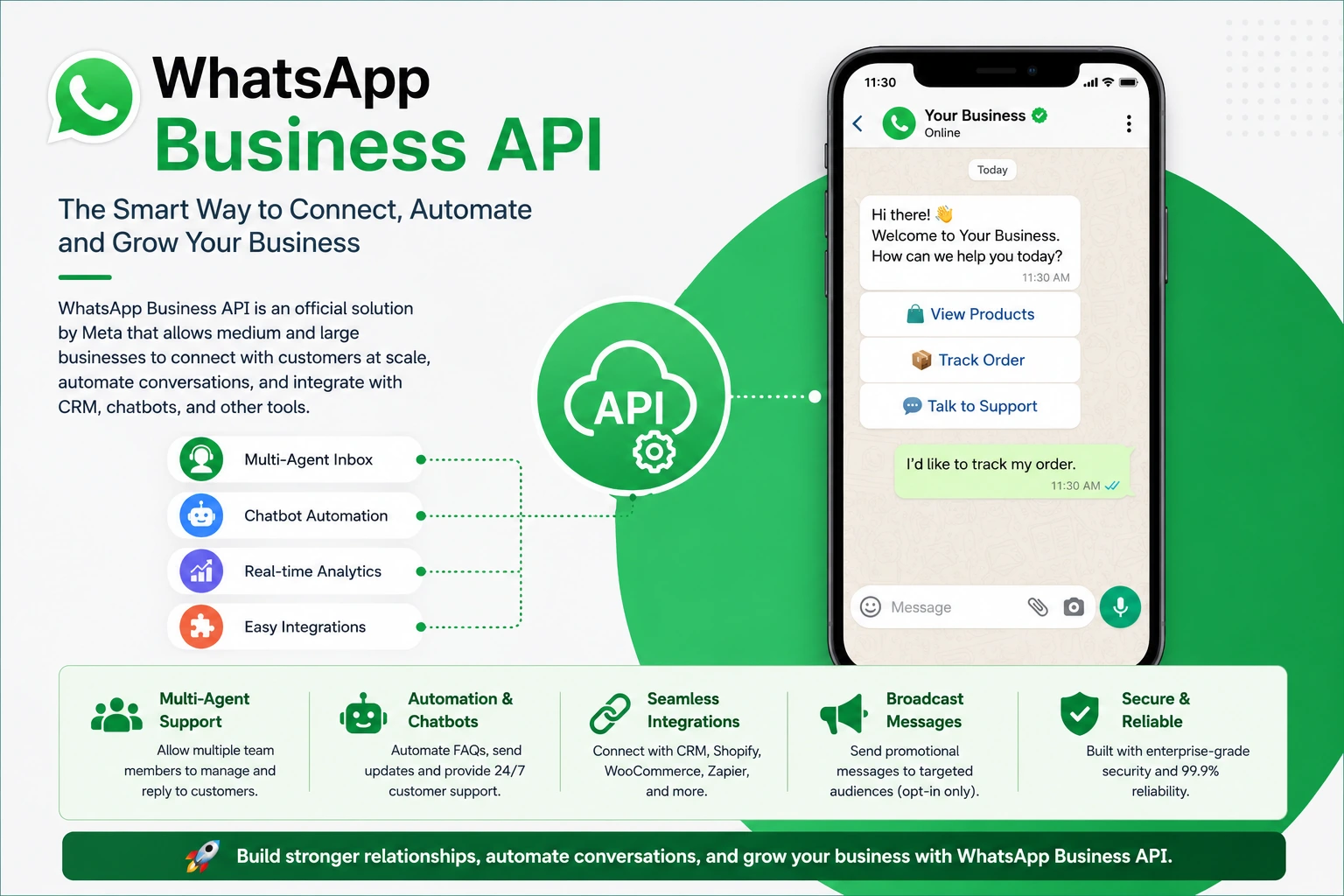
The WhatsApp Business API is Meta’s enterprise messaging platform that allows businesses to communicate with customers on WhatsApp at scale.
Unlike the standard WhatsApp Business App, the API is built for automation, customer support teams, CRM integration, AI chatbots, marketing campaigns, and high-volume messaging.
Instead of manually replying to every customer, businesses can automate conversations while still delivering a personal experience.
With the API, companies can:
- Send order confirmations
- Deliver shipping updates
- Answer customer questions automatically
- Recover abandoned shopping carts
- Book appointments
- Verify users with OTP messages
- Send payment reminders
- Generate qualified sales leads
- Offer 24/7 customer support
This makes it one of the most effective communication tools available for modern businesses.
Why Are Businesses Switching to WhatsApp Business API?
Traditional communication channels often suffer from low engagement.
For example:
- Emails can be ignored.
- Phone calls may go unanswered.
- SMS offers limited interaction.
WhatsApp, on the other hand, is one of the most widely used messaging platforms in the world. Customers are already comfortable using it, making it an ideal channel for business communication.
Businesses are adopting the API because it helps them:
- Respond faster to customer inquiries
- Automate repetitive tasks
- Improve customer satisfaction
- Increase lead conversion rates
- Reduce support costs
- Deliver personalized messaging experiences
- Scale customer communication without increasing team size
As customer expectations continue to rise, automation combined with real-time messaging gives businesses a significant competitive advantage.
How Does WhatsApp Business API Work?
The API acts as a bridge between WhatsApp and your business systems.
Instead of employees manually replying to every message, the API connects with your existing tools to automate conversations and manage customer interactions efficiently.
It can integrate with:
- Customer Relationship Management (CRM) software
- AI chatbots
- Helpdesk platforms
- Marketing automation tools
- E-commerce websites
- Booking systems
- ERP software
- Custom business applications
When a customer sends a message, the system can automatically route the conversation to the appropriate department, trigger predefined workflows, or respond instantly using approved message templates.
This creates a seamless customer experience while reducing manual workload.
Main Features of the Platform
Multi-Agent Support
Unlike the standard business application, multiple team members can manage conversations from the same business number simultaneously.
This is ideal for growing customer support teams.
Smart Automation
Businesses can automate:
- Welcome messages
- Frequently asked questions
- Appointment reminders
- Payment notifications
- Order updates
- Lead qualification
- Customer follow-ups
Automation helps reduce response time while ensuring consistent communication.
AI Chatbot Integration
Connect AI-powered chatbots to answer common customer questions, collect information, and provide instant assistance around the clock.
This reduces workload while improving customer satisfaction.
CRM Integration
The platform integrates with popular CRM systems, allowing businesses to manage customer data, conversation history, and sales pipelines from one place.
Secure Messaging
All customer conversations are protected using WhatsApp’s end-to-end encryption, helping businesses maintain privacy and trust.
Why Businesses Love This Solution
Companies that adopt the platform often experience:
- Faster response times
- Higher customer satisfaction
- Improved sales opportunities
- Better lead management
- Reduced operational costs
- Increased team productivity
- Professional customer support
- Stronger customer relationships
These advantages make it an excellent long-term investment for businesses focused on growth.
Suggested Links
- Buy WhatsApp API
- WhatsApp API Pricing
- WhatsApp API Setup Service
- Meta Business Verification
- WhatsApp API Messaging Limits
- WhatsApp Chatbot Integration
- Verified Meta Business Manager
Recommended External Resources
Meta Developers Documentation
https://developers.facebook.com/docs/whatsapp/
WhatsApp Business Official Website
https://business.whatsapp.com/
Meta Business Help Center
https://www.facebook.com/business/help
WhatsApp Business App vs WhatsApp Business API
Many beginners assume the WhatsApp Business App and the WhatsApp Business API are the same. While both are designed for business communication, they serve different purposes.
| Feature | WhatsApp Business App | WhatsApp Business API |
|---|---|---|
| Best for | Small businesses | Growing & large businesses |
| Multiple team members | ❌ No | ✅ Yes |
| CRM integration | ❌ No | ✅ Yes |
| AI chatbot support | ❌ No | ✅ Yes |
| Automation | Limited | Advanced |
| Marketing campaigns | Limited | ✅ Supported |
| High-volume messaging | ❌ No | ✅ Yes |
| Scalability | Low | High |
If you receive a large number of customer inquiries every day or want to automate communication, the API is the better choice.
Top Benefits for Businesses
1. Deliver Faster Customer Support
Customers expect quick responses. By using automation, businesses can answer common questions instantly, reducing wait times and improving customer satisfaction.
2. Increase Sales Opportunities
Every customer conversation is a chance to generate revenue. Automated replies, product recommendations, and follow-up messages help convert more leads into paying customers.
3. Improve Customer Experience
Customers prefer messaging over long phone calls or delayed email responses. A professional messaging workflow creates a smoother buying experience and builds trust.
4. Automate Repetitive Tasks
Businesses can automate:
- Welcome messages
- Frequently asked questions
- Order confirmations
- Shipping notifications
- Appointment reminders
- Payment reminders
- Feedback requests
Automation saves valuable time and allows your team to focus on higher-value tasks.
5. Work with Your Existing Tools
The platform integrates with many popular business solutions, including:
- Salesforce
- HubSpot
- Zoho CRM
- Shopify
- WooCommerce
- WordPress
- GoHighLevel
- Zapier
- Make
- n8n
This allows businesses to keep customer information synchronized across multiple systems.
Who Should Use WhatsApp Business API?
The API is suitable for almost any business that communicates with customers regularly.
Popular industries include:
E-commerce
- Order confirmations
- Shipping updates
- Product recommendations
- Cart recovery
Digital Marketing Agencies
- Lead qualification
- Campaign support
- Client communication
Healthcare
- Appointment reminders
- Patient support
- Follow-up messages
Education
- Student inquiries
- Admission updates
- Course notifications
Real Estate
- Property inquiries
- Viewing appointments
- Lead nurturing
Financial Services
- Verification messages
- Customer assistance
- Payment reminders
Common Use Cases
Businesses use the platform in many different ways.
Customer Support
Answer customer questions quickly through one centralized communication channel.
Lead Generation
Automatically qualify prospects before handing them over to your sales team.
Appointment Booking
Allow customers to book appointments without calling your office.
Order Tracking
Keep customers informed with automatic shipping and delivery updates.
Marketing Campaigns
Send approved promotional messages to customers who have opted in.
Customer Feedback
Collect reviews and satisfaction surveys after purchases or completed services.
How to Get Started
Setting up the API is easier than many business owners expect.
Step 1: Create a Meta Business Account
Your company needs an active Meta Business account.
Step 2: Complete Business Verification
Verification helps establish trust and unlocks additional platform features.
Step 3: Choose a Trusted Provider
Select a provider that offers reliable setup, technical support, and ongoing assistance.
Step 4: Connect Your Phone Number
Use a business phone number dedicated to customer communication.
Step 5: Configure Message Templates
Create templates for order updates, appointment reminders, notifications, and customer support.
Step 6: Integrate Business Tools
Connect the API with your CRM, helpdesk, chatbot, or eCommerce platform for a seamless workflow.
Step 7: Launch and Monitor
Test your setup, monitor message quality, and optimize conversations based on customer feedback.
Best Practices
To achieve the best results:
- Respond to customers quickly.
- Use clear and professional language.
- Personalize messages whenever possible.
- Keep templates short and relevant.
- Send promotional messages only to users who have opted in.
- Monitor conversation quality regularly.
- Review analytics and improve campaigns over time.
Following these best practices helps maintain a strong messaging reputation and encourages higher customer engagement.
Common Mistakes to Avoid
Many businesses make avoidable mistakes during implementation.
Avoid the following:
- Sending unsolicited promotional messages
- Ignoring Meta’s messaging policies
- Using poorly written templates
- Delaying responses to customer inquiries
- Failing to integrate automation
- Neglecting message quality monitoring
Avoiding these issues helps protect your messaging reputation and ensures long-term success.
Why Choose Our WhatsApp API Service?
We simplify the entire setup process so you can focus on growing your business.
Our service includes:
- Fast WhatsApp API activation
- Assistance with Meta Business verification
- Professional message template configuration
- CRM integration
- AI chatbot integration
- Multi-agent inbox setup
- Ongoing technical support
- Dedicated after-sales assistance
Whether you’re launching your first automation workflow or upgrading your existing customer support system, our team is here to help you every step of the way.
Ready to Transform Your Customer Communication?
Modern customers expect instant, convenient, and personalized communication. Businesses that adopt automation today are better positioned to improve customer satisfaction, increase efficiency, and grow revenue.
If you’re ready to implement a professional messaging solution, our WhatsApp API experts can help you choose the right setup for your business and ensure a smooth deployment from start to finish.